Google Gemini (2026): What Parents, Educators, & Students Need to Know
The AI Tool Millions of Teens Can Access in Seconds
- Google Gemini is built into many Google products, making AI easy for teens to access throughout their day
- Teens may use Gemini to study, complete homework, brainstorm ideas, or get answers without involving a parent or teacher
- AI-generated responses can sound convincing, even when they are inaccurate, biased, or missing important context
- Students may turn to Gemini for advice on personal, academic, or social situations instead of talking with a trusted adult
- Learning how Gemini works can help parents start conversations about using AI responsibly, thinking critically, and knowing when to seek help from real people
Before Your Teen Makes AI Part of Their Routine, Learn How to Help
Google Gemini Isn’t Always Right: Understanding AI Bias and Errors
- Gemini has recently been criticized in the news for reflecting bias and generating inappropriate and inaccurate information and images (Source: Forbes)
- AI allows students the opportunity to cheat on school assignments
- Gemini is not always accurate, and information garnered from responses should always be fact checked
- Google AI Mode is not the same as Gemini. AI Mode is built into Google Search and can answer follow-up questions, while Gemini is a separate AI chatbot. A report found AI Mode gave unsafe or inconsistent answers to some child accounts, while other Gemini-powered tools more consistently directed at-risk students to a trusted adult or counselor (Source: PBS)
Navigating Google Gemini With Your Teen
Understanding the AI Assistant Behind Google’s Tools

- Google’s AI tool is built by the Google DeepMind AI research library (replacing Google Bard) and is a direct competitor to ChatGPT by OpenAI
- Gemini is multimodal, which means that it can understand and generate images or text responses based on text, code, audio, video, and image
- Gemini is built into Google’s search engine and is also available within various Google Workspace programs, including Gmail, Docs, Sheets, Slides, Meet, Drive, Maps and Calendar. It is also built into Android devices and available as an app on iPhones
- The Gemini app can be downloaded from the Google PlayStore to replace the Google Assistant on existing Android devices
- There is an option to “double-check responses” in Gemini to access the internet sources for information it provides
From Flash to Pro: Different Models of Gemini
- Gemini Flash is made to be fast and cheap. Users can input audio, images, video and text and receive text responses
- Gemini Pro is free and the most widely used version, suited to a broad range of operations and used for more complex tasks such as coding and analysis
- There are models of Google Gemini that are subscription-based and offer more features
Google Gemini Can Teach, Not Just Answer Questions
- Guided Learning is a new feature or mode that has been introduced within Gemini, designed specifically for educational purposes
- Instead of just giving a direct answer, the goal of Guided Learning is to act as a "personal AI learning companion,” helping students build a deep understanding of a topic
- Through Guided Learning, Gemini will explain a topic, and then ask questions to ensure that the student understands what they are teaching
- Guided Learning can be accessed on a mobile device or on a desktop
The Skill Behind Getting Better AI Answers
- The Gemini AI chatbot (similar to ChatGPT) uses “prompts,” or text-based instructions, to tell it what kind of information the user wants to receive
- SmartSocial recommends users refine the answers they receive by asking follow-up prompts such as, “Make it more professional” or “Can you give me more information?” since Gemini remembers previous requests
- Prompt engineering is a new term for a field that is made up of people who are experts at creating the perfect prompt to get the best information from AI
Students Can Use Gemini Productively
- Research Assistant: Students can use Gemini as a search engine, provided they double-check all information (we recommend students verify the information with at least two valid sources)
- Writing Assistant: Brainstorming ideas for essays and project ideas, analyzing themes and characters, and identifying literary techniques
- Planning and Organization: Students can use Gemini for organizing tasks and time management, creating to-do lists and schedules
- Language Tutor: Gemini can be used for conversational practice for students who need help with a foreign language. Tell Gemini which language you want to practice and it will generate text that you can respond to in a conversational format
- Formulas: Gemini can provide spreadsheet formulas, check programming code, and provide grammatical help
- Quizzes: Students can tell Gemini to quiz them on specific topics such as history or math problems
Not All AI Tools Are the Same: Gemini vs. ChatGPT Explained
- Gemini is directly connected to the internet, provides real-time information, and makes it easy to check the sources
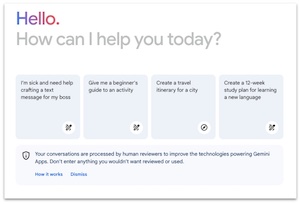
- Gemini offers users the opportunity to rate the responses with either a thumb up or thumb down
- Because Gemini is a Google product, there are more limitations for iOS users
- ChatGPT is more established that Gemini and is embedded in many third-party applications
What Parents Can Learn From Google Gemini Headlines

What Gemini, and early versions of ChatGPT have illustrated is that the tools can produce unforeseeable and sometimes unsettling results that even the engineers working on the advanced technology cannot always predict ahead of a tool's public launch. - NPR
More Resources for Parents, Students, & Educators
ChatGPT Guide: What Parents, Educators, & Students Need to Know
Positive Ways to Use ChatGPT for Students
AI Writing Tools for Students: What You Need to Know About Jasper AI, ChatGPT, and More
How to Use AI for College Prep
Conclusion
Technology is progressing at an expeditious pace and Artificial Intelligence (AI) is at the forefront. Gemini by Google is emerging as a popular alternative to ChatGPT, offering advanced features that can assist with online learning, creativity, and information management.
As Google Gemini continues to develop, it has the potential to be a valuable asset in classrooms and homes alike. By fostering open communication and responsible use, parents and educators can guide students toward leveraging Gemini's capabilities for learning, creativity, and critical thinking. Remember, AI is a tool, and with the right approach, Google Gemini can empower students to become independent learners and responsible digital citizens.
You're not logged in!
Log in or join to protect your family and enter for a chance to win cool prizes
Become a member or log in to learn more on this topic

This is great info, thanks for giving me some ideas on how to start a dialogue with my teen!

Sharon M.
Parent VIP Member
Josh's presentation about social media was unbelievably fantastic. Our students learned so much about what kids should and shouldn't be doing. The fact that it is such a thoughtful process made it all worthwhile.
Director of College Advising
Educator Webinar Attendee
This webinar is a very helpful eye-opener on the apps that are popular with my students.
Irene C.
Educator Webinar Attendee
You're not logged in!
Log in or join to protect your family and enter for a chance to win cool prizes

., start learning from this page to enter for a chance to win one of our 28+ prizes each week.
Hello, I'm Josh, the founder of SmartSocial.com.
Don't leave this page until you fill out our feedback form that will appear after you learn from the resources...