

Sora by OpenAI Guide (2026): What Parents, Educators, & Students Need to Know
NOTE: Sora by OpenAI was removed from both Google Play and the iOS App Store in March of 2026
Sora is an app from OpenAI that uses artificial intelligence to create realistic videos from written text prompts. Users can type a short description, and Sora will generate a lifelike video from the depiction. The app also allows users to remix existing videos or images, adjust styles, and produce clips in different formats, such as widescreen or vertical. Sora makes video creation fast and accessible, giving users an easy way to turn ideas or stories into short, shareable videos using AI.
Although this app can be fun for teens to use, there are some concerns. In this guide, parents will learn what Sora is, the top concerns for teens, and how to help their students use it safely.
ChatGPT & Sora: A Parent's Guide to Safer Settings & Smarter Use (Parent Video)
What is Sora?

- Sora is a text-to-video model developed by OpenAI, with over 1 million downloads to date (source: The Outpost)
- Sora turns a written prompt into a video by using advanced AI models that interpret the text, predict the visuals, and generate each frame to match the description from scratch
- Users can upload still images or short videos, and Sora can animate them, extend them, or remix them into new scenes
- The app supports a feature where users can add themselves (or other approved likenesses) into the videos as avatars/characters
- Sora includes feed-style sharing (similar to TikTok), the ability to browse videos created by others, remix or build on others’ videos, and collaborate in a more social setting rather than strictly private creation
Top Concerns of Sora
- Sora can be misused for bullying when teens create realistic, hurtful videos of others that spread rumors or embarrassment
- Sora generates hyper-realistic videos from text prompts, making it difficult to determine deepfakes
- Teens could use Sora for serious emotional support or crisis help, when the system isn’t designed to be a substitute for real human help
- Even though OpenAI has built in detection of self-harm signals and can notify parents, the timing, reliability and scope of those alerts are still a concern
- Sora tools may inadvertently allow or fail to filter content that’s graphic, violent, sexual, or self-harm oriented
What can parents do?
- Review the app settings and permissions on your child's account frequently to confirm nothing has been altered
- Discuss boundaries with your child about uploading images of themselves or anyone they know, as well as discussing how images can be used or altered once uploaded
- Ensure direct messaging in the Sora App is disabled
- Parents can limit screen time through the settings app on the teen's phone, limiting continuous scrolling
- Discuss with your teen how to block content that is inappropriate, explicit, or violent
- Create a Family Media Agreement with your student to set family expectations about AI use
How to Set Up Parental Controls in Sora
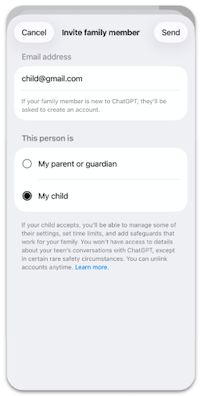
- Link your teen’s ChatGPT account to yours using OpenAI Parental Controls — In your ChatGPT settings, go to Parental Controls → “+ Add family member” → send the invite to your teen
- Adjust Sora-specific settings — Once their account is connected, parents can:
- Turn off the personalized feed, so their video recommendations aren’t based on their history
- Disable continuous scrolling so they can’t endlessly scroll through the feed
- Control direct messaging — decide if they’re allowed to send and receive DMs
- Turn off the personalized feed, so their video recommendations aren’t based on their history
- Set “quiet hours” — Choose times when ChatGPT (and Sora by extension) can’t be used
- OpenAI — Parents can turn off:
- Memory (so the AI doesn’t remember previous conversations)
- Image generation (if you don’t want them creating or editing images)
- Monitor data & sharing — From the Data Controls page, parents can control whether videos go to the public feed and whether they can send/receive DMs
What is Sora rated?
Additional info: Owned by OpenAI
Apple App Store Rating: 13+
Google Play Rating: T (Teen)
Why do students want to be on Sora?
- Sora gives students creative freedom and self-expression, turning their ideas into short videos
- Sora offers instant gratification; students can create videos quickly
- Students enjoy the cameo feature that allows them to star in different scenarios in their own videos
- The Sora app is designed as a social media platform, complete with endless scrolling, likes, comments, and direct messages
Privacy/Setting Recommendations for Sora
- When users set up their accounts on Sora, they are asked for their birthday, but no additional precautions are taken. Parents are recommended to be present when teens are setting up accounts to ensure the correct birthday is given
Sora App in the News

Even with filters and watermarks, Sora can generate disturbing or inappropriate content," she said. "And because kids can unlink their accounts from their parents' supervision at any time, those safeguards aren't foolproof. - ABC News

Like a lot of the AI videos you see online these days, Sora's are highly realistic and often difficult to distinguish from actual footage,’ says Yaron Litwin, a social media expert and CMO of the Canopy Parental Control App. When you consider the dangerous content of some of these videos, there is a lot to be concerned about. - Parents.com
Conclusion
Sora by OpenAI allows users to create realistic AI-generated videos from simple text prompts, giving teens a powerful new way to express themselves creatively. However, its features, like uploading personal likenesses and remixing content, raise serious concerns about privacy, misinformation, and exposure to inappropriate or misleading material. Parents should be aware that Sora’s parental controls are still limited, making open communication, supervision, and clear boundaries essential. By staying informed and talking regularly with their children, parents can help ensure that creativity and safety go hand in hand as teens explore this new technology.
More resources for parents, students, & educators
Teen AI Misuse: Fake Photos, Dangerous Pranks, and Deepfakes
You're not logged in!
Log in or join to protect your family and enter for a chance to win cool prizes
Become a member or log in to learn more on this topic

This is great info, thanks for giving me some ideas on how to start a dialogue with my teen!

Sharon M.
Parent VIP Member
Josh's presentation about social media was unbelievably fantastic. Our students learned so much about what kids should and shouldn't be doing. The fact that it is such a thoughtful process made it all worthwhile.
Director of College Advising
Educator Webinar Attendee
This webinar is a very helpful eye-opener on the apps that are popular with my students.
Irene C.
Educator Webinar Attendee
You're not logged in!
Log in or join to protect your family and enter for a chance to win cool prizes

., start learning from this page to enter for a chance to win one of our 28+ prizes each week.
Hello, I'm Josh, the founder of SmartSocial.com.
Don't leave this page until you fill out our feedback form that will appear after you learn from the resources...


%20(1).jpg)